Screen sharing for financial services rooms
Bring presentations, dashboards and client materials into one shared workspace. Polaris supports sharing across configured networks, browser joining from laptops, and central room management for your boardrooms, client suites and team spaces.
Keep the meeting moving
Clients need a clear way to present. IT needs a deployment that fits the firm’s network, security review and maintenance schedule.
Corporate, front-office and guest devices may sit on different network segments. Sharing a dashboard or presentation should be part of the deployment plan.
A client presentation can start with an unfamiliar adapter, software-install request or device restriction.
Your security and vendor-risk teams need to understand the architecture, data paths, audit scope and operating requirements before approving new room technology.
Rooms need updates and consistent settings without interrupting client meetings or market-hour work.
Match the hardware to the room
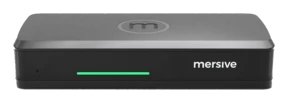
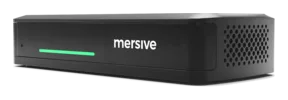
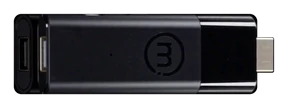
Essentials runs the same Polaris software as Pro: the same workspace, the same cloud, the same security posture. The differences are the chassis, not the platform.
- Share presentations and dashboards in the same workspace, including across configured networks.
- Use the room’s compatible camera and microphone wirelessly in a laptop-led call.
- Link is a software bridge between the laptop in BYOM and the Pro, and the Pro is what controls the room's cameras and peripherals. That is why Link needs a Pro.
- Choose Pro where the room also needs wired video input or additional display connections.
See current purchase options and specifications.
Explore Polaris Pro- Share from supported laptop browsers into the same Polaris workspace.
- Use cross-network sharing, Polaris Cloud management and the same security controls as Pro.
- Choose Essentials for screen sharing where the room does not need the pod to connect a camera and microphone to a laptop call.
See current purchase options and specifications.
Explore Polaris EssentialsBoth products support cross-network sharing. For wireless use of the room’s camera and microphone, choose Pro: Essentials cannot provide those connections through a license change.
Bring the right material into view
Review contributions together, whether presenters are on different network segments or joining from their own laptops.
Share across configured networks
Put a team’s dashboard and a client’s presentation in the same workspace. Cross-network sharing is available on Pro and Essentials. Confirm the required endpoints, ports and allowed connections with your IT team, then test the intended paths before rollout.
Review cross-network sharing →Give clients a browser joining path
A client with a supported laptop browser can join using the key on the room display and choose what to share. There is no sharing app to install. Phones and tablets use the supported Mersive app or native sharing protocol; mobile browser screen capture is not the laptop joining path.
See how browser joining works →Review the controls and their evidence
Assess the device, the cloud and the information security management system within their own scopes. Use the Trust Center to check the architecture and supporting documentation against your firm’s requirements.
BNL’s Solstice deployment
Earlier Solstice generation (Gen 3 era), 2019 vintage
“Being in the financial industry, data security and centralized management are paramount. We sought the right wireless solution to create a clean, easy and inclusive working environment.”
The published BNL case study describes its earlier Solstice deployment: 115 Pods at the Rome headquarters, followed by 15 in Milan and 20 in another Rome building. These figures describe that historical deployment, not Polaris results. Read the BNL case study →
Check the scope, period and findings
Mersive’s ISO/IEC 27001:2022 certificate, 011964-03, covers the ISMS supporting the Mersive Collaboration Suite (Solstice Cloud System). It is valid through 26 June 2028, with no nonconformities at the June 2026 surveillance audit.
The SOC 2 Type 2 report currently documented on the Mersive Trust center covers the Polaris cloud management console, with an opinion dated 15 July 2025. It examines security, confidentiality and availability. The room appliances are outside the report’s system boundary.
The report examines 46 controls across 11 families and records a single exception, on the HR control covering annual performance evaluations. Management’s response is included in the report. Under the audited data-management policy, room names, session names, device metadata, operating-system information and anonymized usage data are all classified Confidential.
Your team can use this evidence alongside the device assessments and deployment documentation to evaluate Polaris against the firm’s requirements. The SOC 2 report is supplied under NDA; the SOC 3 report is intended for general distribution.
Review the security evidence →Try Polaris in your own rooms
Test client presentations, internal meetings and the sharing paths your network team approves. Use the trial to assess the fit with your devices, room equipment and operating requirements.
Request a trial