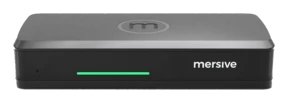
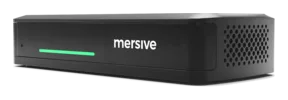
Polaris Pro spec sheet
The deep end of the platform: full workspace, true wireless BYOM, HDMI input and dual 4K60 output, built for enterprise networks and the rooms where decisions actually get made.
Prints as a clean white datasheet with a date stamp on every page. This page is the living version: share the link, not the file.

Performance is not optional. It's a requirement.
Polaris Pro is built for modern enterprises, higher education institutions, and healthcare organizations. Dual 4K60 HDMI output, HDMI input, PoE+ single-cable install, and enterprise 802.1X networking carry critical board meetings and collaborative classrooms alike, and the room's own silicon does the compositing, so nobody's laptop is load-bearing.
The full multi-share workspace
Up to 10 live sources composited side by side, compared, annotated, and rearranged live, laid out automatically as sources join and leave. Essentials runs the same workspace with a ceiling of 5.
True wireless BYOM
Your Teams, Zoom, Webex, or Meet call with the room's camera and mic. No cable on the table, and multi-user, so the second presenter never waits for a dongle.
Cross-network sharing
Guests on LTE, staff on corporate Wi-Fi, the display on an AV VLAN: one workspace, no VPN, no UC call. Signaling is outbound-only TLS on TCP 443, so there are no inbound firewall rules to request. Included on every Polaris tier.
Web-join: nothing to install
Share from the browser on the device you walked in with, Chromebooks included. No client, no admin rights, no dongle drawer.
Native AirPlay, Miracast & Google Cast
The casting paths your devices already speak, built in. Every share lands on the same workspace, side by side.
Managed by Polaris Cloud
Analytics, firmware, alerts, health, and idle-screen signage across the fleet, from one login, with multi-organization management.
Polaris Pro hardware
Sharing & video
| Specification | Polaris Pro |
|---|---|
| Simultaneous shares | Polaris Pro can currently support up to 10 live sources composited side by side |
| Sharing paths | Browser web-join (no app) · native AirPlay, Miracast, Google Cast (LAN) · Polaris app for iOS and Android · HDMI input for wired ingest |
| Protocols | WebRTC, AirPlay, Miracast, Google Cast |
| Video codecs | H.264 encode and decode · H.265 encode and decode · VP8 decode · VP9 decode · MPEG-4 decode · AV1 decode · JPEG/MJPEG decode. In service: H.264 carries AirPlay, Miracast and web-join over WebRTC; VP8 carries Google Cast; VP9 decodes digital signage playback |
| Hardware decode ceilings | Per codec, at maximum: H.264 and H.265/HEVC 160 Mbps at 4K (3840 × 2160) 90fps · VP9 120 Mbps at 4K (3840 × 2160) 90fps · MPEG-4 60 Mbps at 1920 × 1080 60fps · VP8 40 Mbps at 1920 × 1080 60fps. AV1 and JPEG/MJPEG decode without a published ceiling |
| Resolution | Output: 640 × 480 (SD) through 4K (3840 × 2160), at up to 60 Hz. Dual 4K (3840 × 2160 @ 60Hz) · HD (1920 × 1080 @ up to 60Hz) · (1280 × 720 @ up to 60Hz). Input: 1280 × 720 through 4K (3840 × 2160), at up to 60 Hz |
| Video pipeline | Decodes 2× 4K60 or 4× 1080p60 concurrently; the compositor imposes no cap at the layout layer |
| Wired HDMI input modes | Polaris Pro has two wired HDMI input modes, selected by the room administrator. Workspace tile is the default: the input joins the workspace alongside wireless shares and is visible to remote participants. Direct bypass (full-screen pass-through) sends the input straight to the room display, outside the workspace. Remote participants do not receive that feed. |
| Content protection | HDCP 2.0, with a software HDCP toggle on the HDMI input |
Compute
| Specification | Polaris Pro |
|---|---|
| Chipset / SoC | MediaTek MT8395AV/ZA (Genio 1200): 8-core ARM, 4× Cortex-A78 and 4× Cortex-A55 at up to 2.2 GHz, with Mali GPU and on-die APU (MediaTek's name for its NPU), OpenGL ES 3.0 / Vulkan. |
| NPU: on-device AI silicon | NPU 4.8 TOPS (INT8) in the MediaTek documentation, 9.6 TOPS at minimum precision (INT4), the convention MediaTek uses for its current Genio series. |
| RAM · storage | 16 GB LPDDR4 · 32 GB eMMC: 19 GB available for storage, the remainder holding the system image and the second partition that carries an OTA update and allows firmware rollback |
Network & security
| Specification | Polaris Pro |
|---|---|
| Ethernet | 1× 10/100/1000 RJ-45, PoE+ (802.3at Type 2) |
| Wi-Fi | MediaTek MT7921: Wi-Fi 6 (802.11ax), 802.11 a/b/g/n/ac/ax compliant, 2.4 + 5 GHz, MIMO 2×2; Bluetooth 5.2 (MediaTek MT7921) |
| Dual-network posture | Wired GbE and the wireless radio run simultaneously, kept isolated: corporate on the wire, guests on Wi-Fi |
| Network protocols | TCP/IP, HTTP, HTTPS, SNTP/NTP, SSL, SSH, UDP |
| 802.1X authentication | ✓ EAP-TLS, PEAP, TTLS or EAP-PWD, on wired Ethernet and on Wi-Fi (WPA2-Enterprise). Supply a CA certificate, a client certificate and a private key; the supplied private key is held encrypted at rest under a key that is itself sealed in the NXP SE050 secure element, rather than in plaintext configuration |
| Cross-network sharing | Cloud-negotiated direct connections; signaling outbound-only TLS on TCP 443; no inbound firewall rules; no VPN |
| Device security | Mandatory secure boot, rooted in Trusted Firmware-A (TF-A) · NXP SE050 secure element holding the device’s own identity keys · signed updates with downgrade protection · A/B firmware partitions with automatic rollback on a failed load · no content persistence · USB access by allowlist · Kensington Nano Security Slot |
Plain language: 802.1X means the network demands the device prove who it is before granting a port, and EAP-TLS proves it with a certificate instead of a password. Dual-network posture means the device sits on two networks at once, kept isolated, so guests share without ever touching the corporate LAN.
Physical & environmental
| Specification | Polaris Pro |
|---|---|
| Rear panel | Kensington Nano Security Slot · Ethernet (PoE+) · DC power · analog audio out · 2× USB 3.0 Type-C (female), host mode · 2× HDMI 2.0 out · 1× HDMI 2.0 in |
| USB | 2× USB 3.0+ Type-C (female), host mode · output 5 V at 0.9 A maximum · no USB Power Delivery. For cameras, microphones, speakers, sensors, serial adapters and other room peripherals |
| Audio | Dedicated analog audio-out jack: room audio goes straight to a soundbar or DSP without passing through the display |
| Power | PoE+ (802.3at Type 2) for single-cable install, or 12 VDC, 2 A, 24 W max from the barrel jack. The power supply is sold separately on Pro |
| Dimensions · weight | 86 × 184 × 30 mm. Pro and Essentials are different chassis: Essentials is 58 × 140 × 30 mm. Both released data sheets print 150 × 67 × 30 mm and 204 g for both products, which cannot be true of two different enclosures; the sheets are being reissued |
| Operating environment | Indoor use only · 0°C (32°F) to 35°C (95°F) · 30% to 70% RH ambient |
| Storage environment | -20°C (-4°F) to 65°C (149°F) · 10% to 90% RH |
| Drop durability | 1 m onto concrete along any critical axis — face, corner or edge — with no cables connected |
| ESD | IEC 61000-4-2 Level 4 · ±8 kV contact · ±15 kV air discharge |
| Thermal | No throttling of CPU, GPU or VPU at 100% load, with LEDs at 100% and all other systems at 100%, sustained for not less than 8 hours |
| Accessories | Power Supply Unit (not included) · HDMI cable (not included) |
| Regulatory | FCC (USA) · UL (USA/Canada) · CB Scheme / IECEE (international) · UKCA (UK) · CE (EU) · RoHS (EU) · SCIP (EU) |
| TAA | TAA compliant |
| Warranty | Full warranty while on active subscription; on a perpetual license it is capped at seven years. |
| Licensing | 3-year or perpetual |
The device is tested too, by someone else.
Secure boot is mandatory on production firmware. The device’s own private keys are generated and used inside an NXP SE050 secure element and never cross its boundary. Customer 802.1X certificate material is held in the device’s certificate store, protected by secure boot and the hardened OS. Update packages are checked for authenticity and integrity before they are applied, and the device refuses downgrades. The pod also keeps two firmware partitions, so a load that fails to come up returns to the last known-good version. Shared content is composited on the fly rather than written to the device, and ephemeral session data is overwritten at the end of every session. In May 2025 an outside security firm took a Gen 4 Pod in hand, opened it, and attacked it physically: the debug headers, the flash, and a lab man-in-the-middle. No critical, high, medium or low-severity vulnerabilities were identified. Their caveat, which we keep: that does not make compromise impossible, but it would take an adversary of significant skill and effort. Mersive’s information security management system is ISO/IEC 27001:2022 certified, with no nonconformities raised at the June 2026 surveillance audit, and the Polaris cloud this unit reports to is SOC 2 Type 2 attested. The full architecture and every scope statement: the Trust Center.
Essentials and Pro, side by side
| Polaris Essentials | Polaris Pro | |
|---|---|---|
| Simultaneous shares in the workspace | Up to 5 | Up to 10 |
| HDMI output | 1× HDMI 2.0 out · 4K (4096 × 2160) at 30 Hz | 2× HDMI 2.0 out · dual 4K (3840 × 2160) at 60 Hz |
| HDMI input (wired ingest) | — | 1× HDMI 2.0 in |
| True wireless BYOM conferencing | — | Included |
| USB for room peripherals | — | 2× USB 3.0 Type-C, host mode |
| Audio out (to soundbar / DSP) | — | Included |
| Power over Ethernet | — | PoE+ |
| Power supply unit | In the box | Sold separately; PoE+ is typical |
| Web-join, workspace, cross-network, Polaris Cloud | Included | Included |
Buy in year eight. Drop it in beside year one.
Mersive commits to a 10-year manufacturing lifecycle for Polaris hardware, held constant by the platform invariants rather than by a fixed parts list.
The unit bought in year eight will behave exactly like the one bought in year one, and goes into the same fleet without a second thought. That is what the list below guarantees, and it is the product promise rather than a caveat about parts.
The ports on the back of the unit, and what each one does, per tier.
Including the workspace share ceiling for that tier. The room behaves the same way in year 10 as on day one.
The same cloud, the same policies, the same fleet tooling, across every vintage in the fleet.
Secure boot, sealed key custody, 802.1X, allowlisted USB, and signed no-downgrade updates with dual-partition rollback.
The compliance position the unit ships with does not quietly change underneath a procurement team.
Any unit interoperates with any other unit of its tier. Vintage is not something an AV manager has to track.
Where the promise stops
- Fungibility is within a tier. Pro and Essentials are not interchangeable: different share ceilings, BYOM on Pro only, PoE on Pro only, and different chassis.
- The NXP SE050 secure element is invariant-adjacent. It is named in the published security architecture and in the third-party device assessment, so any change requires CISO sign-off and a Trust Center update — never a routine BOM swap.
- Substitution is not free. Any radio or SoC change triggers regulatory re-filing and a fresh TAA country-of-origin attestation.
Current silicon, as of 26 August 2026
For security reviewers and for TAA and procurement questions. Every part here is expected to be substituted at some point in the lifecycle — that is the mechanism above working, not a departure from it. The invariants are the commitment; this table is a snapshot.
| Component | Part |
|---|---|
| SoC · Pro | MediaTek MT8395AV/ZA (Genio 1200) — ARM, Mali GPU, on-die APU |
| SoC · Essentials | MediaTek MT8370 (Genio 510) — ARM, Mali GPU, APU |
| Wi-Fi / Bluetooth | MediaTek MT7921 — Wi-Fi 6 (802.11ax) |
| Secure element | NXP SE050F2HQ1/Z018HZ, I2C bus |
| RAM · Pro | Micron MT53E2G32D4DE-046 WT:C, 16 GB |
| RTC battery | CR2032 |
The full platform picture, Launch and the hybrid add-ons included: the Polaris family.
©2026 Mersive Technologies, Inc. · 1667 Cole Blvd. Suite 225, Lakewood, Colorado · mersive.com